For the Mac that does the work
Get your disk back. See exactly why.
Plumb finds the build output, caches, Docker images and forgotten tools filling your Mac, sorts every item by how safe it is to delete, and shows you each path before anything goes.
- Rebuildable, in one GitHub folder
- 398 GB
- Build and dependency folders
- 939
- Biggest single .next cache
- 52 GB
- Documents, photos or passwords touched
- 0
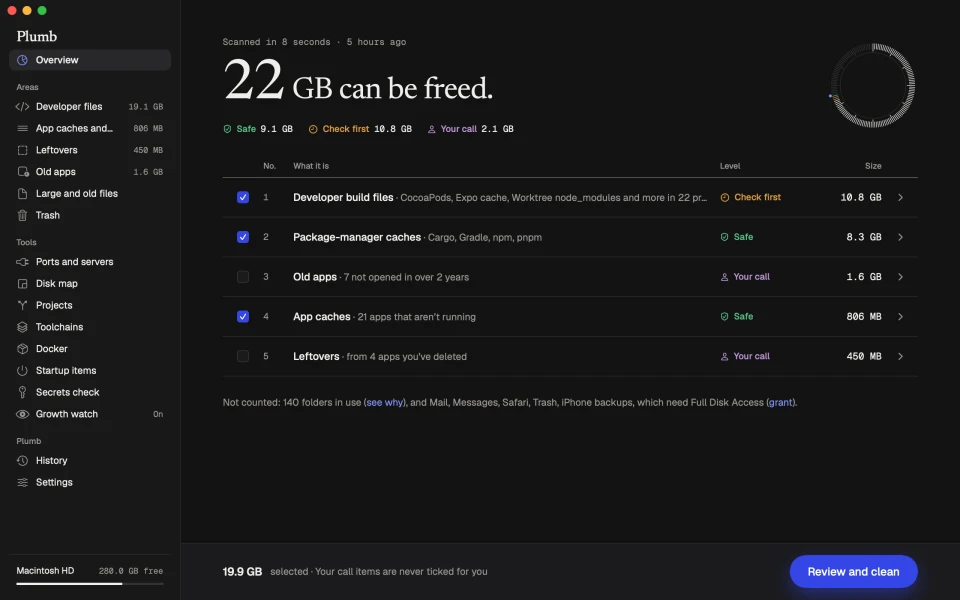
Three levels of safe. Shown on every item.
Most cleaners have one button and a promise. Plumb tells you what each thing is, why it’s safe or not, and what rebuilds it.
Copies your apps can rebuild.
Package caches, Docker images, app caches, Apple’s saved iPhone updates. Ticked for you. Nothing is lost.
Safe once nothing is using it.
.next, .turbo, Rust target, iOS and Android builds. Only if git ignores it, nothing changed for 2 days, and no dev server is running there.
Only you can decide.
Docker volumes, emulator images, old apps, backups. Never ticked for you, and they go to the Trash so you can change your mind.
More than a cleaner.
Developer build files
.next, .turbo, Rust target, Xcode and Gradle output across every project, checked against git and running dev servers.
Docker, explained
Images and build cache cleaned safely. Every volume named with the container and compose file that made it.
Ports and dev servers
See what’s on :3000 and which project owns it. Stop the forgotten one politely.
Projects and worktrees
Every repo with its size and last commit. Find worktrees whose branches are already merged.
Disk map
Your home folder drawn to scale, with the rebuildable part shaded. Click to go inside.
Toolchains
Node versions, simulator runtimes and Android SDKs that no project asks for.
Growth watch
A quiet alert when a .next or .turbo folder passes your limit, before the disk fills again.
Secrets check
Finds loose keys in old projects, Downloads and the Trash. Report only. Values masked, nothing uploaded.
Mac junk, done honestly
App caches, old logs, leftovers from deleted apps, old apps, saved iPhone updates and the Trash.
Startup items
What runs at login and in the background, in plain words. Broken agents flagged.
What Plumb will never do.
- Delete anything you haven’t seen in a list first.
- Touch your documents, photos, Music library or passwords.
- Strip parts out of apps, which breaks their signatures.
- Clear browser history or cookies and call it junk.
- Offer to “free up RAM”. macOS already manages memory.
- Scare you. No “your Mac is at risk”, ever.
Same engine, in your terminal.
plumb scan only reports. plumb clean prints the plan first and asks about anything risky. JSON output for scripts, and it respects NO_COLOR.
$ plumb scan 142 GB can be freed 21.6 GB safe · 97.2 GB check first · 23.2 GB your call 1 Developer build files 97.2 GB check first 2 Android emulator images 12.4 GB your call 3 App caches and logs 8.1 GB safe Next: plumb clean reviews these with you.
Questions
Why does macOS warn me when I open it?
Plumb isn’t signed and notarised by Apple yet, so Gatekeeper asks you to confirm you trust it. That’s coming before 1.0. Until then, the install steps below take about a minute, and you only do them once.
Can it break a project I’m working on?
Build folders are only suggested if git ignores them, nothing inside changed for 2 days, and no dev server is running in that project. Each one is checked again just before it’s removed.
Why does it ask for Full Disk Access?
To measure Mail, Messages and Safari data. You can skip it. Plumb still scans everything else and tells you what it couldn’t measure, instead of showing 0 B.
Can I undo a clean?
Safe and check-first items rebuild themselves. Your-call items go to the Trash, so you can put them back until you empty it. Every clean writes a plain-text log of each path.
Does it work alongside CleanMyMac?
Yes. Plumb expects some caches to be empty already and doesn’t fight over the same folders. Its edge is the developer waste other cleaners miss.
Does anything leave my Mac?
No. Scans, logs and the secrets check stay on your computer. The only network use is the optional speed test in the menu bar, which talks to Apple’s servers when you click it.
Install in about a minute.
Plumb isn't signed by Apple yet. We're finishing signing and notarisation before 1.0, so for now macOS asks you to allow it once. Here is exactly what you'll see.
- 1
- 2
Drag it to Applications
Open the .dmg and drag Plumb into your Applications folder. Then eject the disk image.
- 3
Open it once
Double-click Plumb. macOS says it can’t check it for malicious software, because it isn’t signed yet. Click Done, not Move to Trash.
- 4
Allow it in System Settings
Open System Settings › Privacy & Security, scroll to Security and click Open Anyway next to Plumb. Enter your Mac password, then choose Open Anyway again. You only do this once.
- 5
Scan
Plumb opens to its welcome screen. Full Disk Access is optional; skip it and Plumb tells you what it couldn’t measure.
Prefer Terminal?
After dragging Plumb to Applications, this clears the “downloaded from the internet” flag so macOS stops asking. Only run it for apps you trust.
$ xattr -dr com.apple.quarantine /Applications/Plumb.appChecking the download? SHA-256: 8cc6016772a756a02eee93ae7acf484381ca670aa14339afc7ff4c6650f0c534 · Homebrew install arrives with the signed release.
For the Mac that does the work.
Join the developers getting their disk back. A scan takes about a minute and deletes nothing. You decide what goes.